I'm a software developer with a background in applied computer science from UCLL Leuven. Outside of work, I like building things end-to-end, from software projects to hardware tinkering, 3D design, and everything in between. I enjoy taking on practical, real-world problems and turning ideas into things that actually work
Turning a worn-out e-bike battery into a safe, high-power portable power station.
Hardware
3D Printing
Electronics
DIY
Overview
I used to ride my e-bike to work every day until the battery degraded to the
point where it could no longer hold a charge for the round trip. After buying a
replacement pack, I didn’t want the old battery to go to waste, so I decided to
turn it into something genuinely useful: a portable power station.
Because it was a large battery, I set myself a challenge: make it not just
functional, but a properly finished, safe product I’d actually trust to use
every day. Working with lithium batteries can be dangerous, so safety drove
almost every decision in the build.
The result is a power station with a 140W USB module capable of charging
anything from a phone to a power-hungry laptop, later extended with a 24V
expansion that lets it run larger appliances like my compressor coolbox.
Key features
140W USB module with two USB-A and two USB-C ports, USB-C delivering
full 20V Power Delivery (140W total across the module).
24V XT-60 expansion adding two 24V ports later, with a custom cable
that plugs a compressor coolbox straight into the pack.
Safety-first electronics, with the original battery and BMS left
completely untouched, fusing at every stage of the circuit to protect
both the battery and each individual component, and components rated
well beyond their actual load.
Kill switch wired to a relay that cuts power to the entire system
instantly.
Live monitoring through a small display showing voltage and battery
percentage.
Active cooling from a fan tied to the USB module that pulls fresh air
into the enclosure whenever the module climbs above 40°C.
Custom-fitted housing, a 3D-printed end-cap that replaces the original
e-bike terminal, matched precisely to the battery’s metal shell, which is
kept as a strong protective outer case.
The build
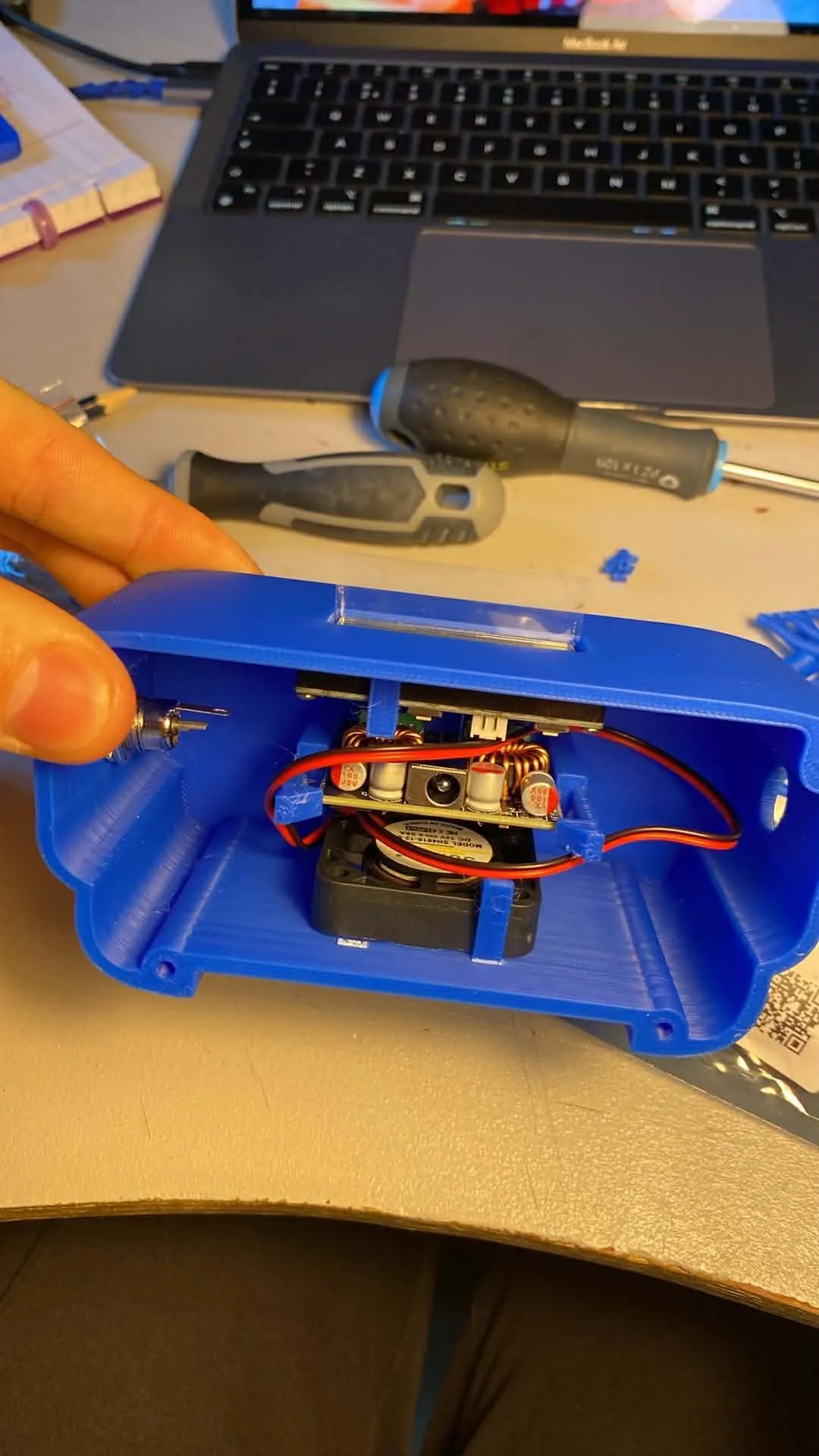
Inside the USB module, with its buck converter, a fuse on just about everything, and the fan that kicks in when it warms up.
The core is a 36V 10Ah e-bike battery, left intact with its original BMS. A buck
converter steps the voltage down to 24V, which feeds both the USB module (for
full 20V PD) and the 24V XT-60 ports. The original charge port was kept but
swapped for a sturdier metal connector.
Every stage is fused, every component is rated well beyond its real load, and
a relay-driven kill switch can cut the whole system instantly. These are the
details that turn a battery and a converter into something safe to leave
running unattended.
The enclosure end-cap was modelled in OnShape, my first time doing any 3D
modelling at all. I originally wanted to print in PETG carbon fibre for its
higher temperature resistance, but a faulty filament batch caused endless print
problems, so I ended up printing in standard PLA. It could warp at higher
temperatures, but so far it has held up fine.
For the coolbox, I built a custom XT-60 cable that connects the compressor cooler
directly to the pack. To test it properly, I took a full cooler of cold beer and
ice packs to a festival in temperatures up to 38°C, and even after adding warm
drinks to chill, I had ice-cold beer for two full days straight before the pack
ran empty.
Challenges
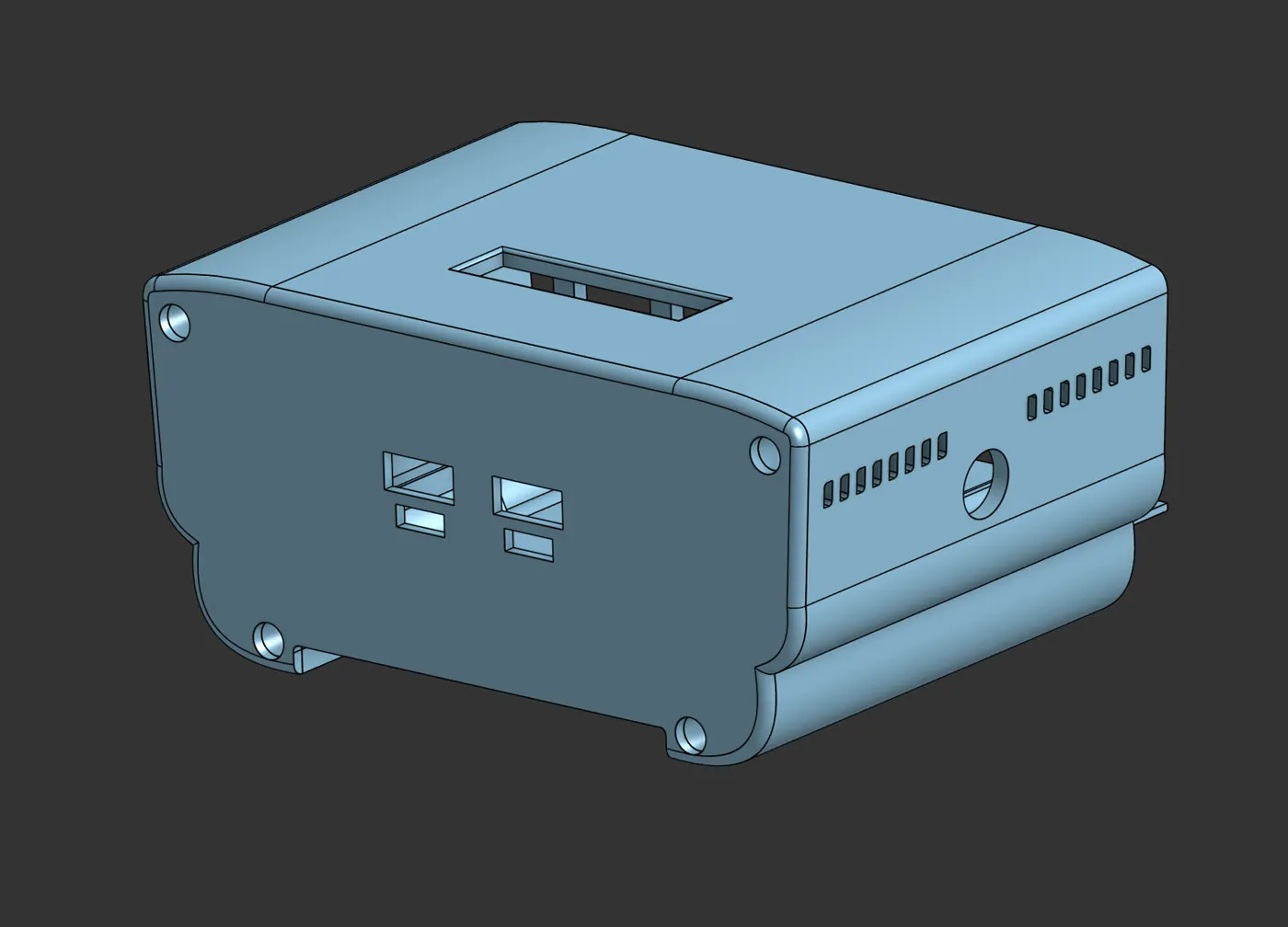
The whole thing modelled in OnShape, my first proper CAD project.
The hardest part was the 3D model. Every component had to fit onto it perfectly
and line up with the battery’s existing metal housing, which meant painstakingly
recreating the original terminal’s exact dimensions. It took a lot of headaches
and test prints to get right, especially as a complete 3D-modelling beginner.
What I learned
This project taught me a huge amount across several disciplines: designing
electronic logic from scratch, 3D modelling from zero, and (maybe most of all)
patience. Working with batteries also gave me a healthy respect for doing things
safely and not cutting corners when the stakes are real.
software·July 2026
HydroSafe Mobile App
An all-in-one safety companion for whitewater kayakers, with live gauge data, hazard reports, and river info for every section.
Mobile
Flutter
Supabase
Overview
HydroSafe Mobile App is the phone half of the broader HydroSafe project, an
all-in-one companion for whitewater kayakers that brings together everything
needed to judge a river section before heading out: live gauge-based water
levels, calibration data, community-reported hazards, and a personal paddle
log. It works alongside the HydroSafe Garmin Watch App, pulling hazard
reports and calibration data onto the wrist for on-river warnings, and
pulling session data back afterward to auto-fill the paddle log.
The core idea is awareness: whitewater kayaking is a genuinely dangerous
sport, and a lot of that risk comes down to not knowing the current
condition of a specific section, or not knowing about a hazard someone else
already spotted. HydroSafe tries to close that gap with live data and a
community reporting layer.
Key features
Map overview with all river sections plotted and color-coded by
their live gauge reading against that section’s calibration (low /
optimal / high water), so runnability is visible at a glance
Section detail page with a 48-hour gauge level chart, calibration
data for that specific section (including optimal flow range where
available), and any community-reported hazards
Community hazard reporting lets paddlers drop a hazard directly on
the map with an exact location, note, photo, and severity, visible to
anyone checking that section before heading out
Favorites to save sections for quick access
Threshold notifications that alert you when a section’s gauge level
rises above a configured threshold
Nearby gauges, useful when a section’s own gauge is missing or
unreliable
Practical info covering intake/take-out locations and parking per
section
Paddle log to review a paddled section with a fun score, scare factor,
notes, and photos. Duration, gauge level, and section name are auto-filled
when synced from the watch app, along with the exact gauge chart from
the time of the session. Sections you’ve already run show your past
review when you revisit them
Data & architecture
Gathering reliable river and gauge data turned out to be the hardest part
of the whole build. HydroSafe pulls from a range of sources covering
different parts of Europe, starting with an API key kindly provided by a
community river-mapping project, then expanded with additional gauge and
river data sources found independently, each with its own format and
quirks. A Supabase edge function runs on a 5-minute cron schedule to fetch,
normalize, and write all of this into HydroSafe’s own database structure.
River section geometry (the actual shape of each section on the map) is
sourced from OpenStreetMap via a third-party OSM/Overpass integration,
since none of the gauge data sources provide precise section-level
geometry themselves. Because OpenStreetMap data is released under the
ODbL (a copyleft license requiring attribution, and requiring that any
publicly redistributed derivative database also be released under
ODbL), OSM-derived geometry is kept structurally separate from HydroSafe’s
own proprietary data (hazards, reviews, user content) so the licensing
obligations stay scoped to what’s actually derived from OSM.
Stack: Flutter frontend, Supabase backend (Postgres + scheduled edge
functions), Cloudflare, and open-source geographic data and tooling
including OpenStreetMap.
UI design
The interface is deliberately kept close to monochrome, with color used
sparingly and specifically for water-level status, so a paddler can tell
whether a section is runnable at a glance, without needing to interpret raw
gauge numbers. Charts and calibration indicators are built to be read in a
few seconds, not studied.
Challenges
Sourcing and normalizing gauge and river data from many different
providers across Europe, each with its own format, update frequency, and
reliability
Building the geometry pipeline to extract accurate, section-level river
shapes from OpenStreetMap via a third-party Overpass-style integrator
Respecting ODbL licensing on OSM-derived data while keeping it cleanly
separated from HydroSafe’s own proprietary hazard and review data
Designing a UI clear enough that runnability is obvious at a glance, for
users who may not want to interpret raw gauge data themselves
What I learned
Building a normalization pipeline across multiple real-world data
sources with inconsistent formats
Supabase edge functions and cron-based scheduling for periodic data
ingestion
GIS-adjacent skills, extracting and working with river geometry via
OpenStreetMap/Overpass tooling
Correctly navigating open data licensing (ODbL) when building on top of
community geographic data
UI/UX design focused on at-a-glance clarity for a safety-critical,
outdoor use case
Almost all core features are built and working, but several still need
polish for navigation and clarity, and a few edge cases aren’t fully
reliable yet.
software·July 2026
HydroSafe Garmin Watch App
A Garmin watch companion that warns whitewater kayakers of upcoming hazards in real time, mid-descent.
Garmin
Monkey C
Embedded
Overview
HydroSafe Garmin Watch App is the wearable half of the HydroSafe project,
a way to bring hazard awareness onto the wrist of a whitewater kayaker while
they’re actually on the water, no phone required mid-run. Before a session,
river section and hazard data is pushed to the watch; during the session
the watch tracks the run natively and warns the paddler as they approach
known hazards, using sound and vibration so they don’t need to look down.
After the session, activity data (GPS track, duration, gauge level, and
any hazards logged live) syncs back to feed HydroSafe’s paddle log and
community hazard database.
The first version targets the Garmin Instinct on purpose: a rugged,
button-first device built for extreme sports, but also one of the hardest
Garmin models to design for, with a 2-color display and an intrusive circular
overlay in one corner. Designing for the hardest case first meant every
other Garmin device the app might later support should be easier to fit.
Key features
Starts a native Garmin “whitewater” activity in the background for the
session, tracking duration, distance, heart rate, and standard activity
metrics alongside HydroSafe’s own data
Live distance-to-next-hazard tracking, with a configurable early warning
(e.g. first alert at 200m out)
Escalating alert as the hazard gets close, using vibration and sound with
a distinct sound per hazard type so the paddler can recognize what’s
coming up without looking at the screen
In-session hazard logging: pressing ‘UP’ opens a short on-device form to
record hazard type and severity, automatically geotagged, so the paddler
can log a hazard and keep going without breaking focus
Post-session sync lets the paddler enrich logged hazards with notes and
photos via the mobile app; the enriched hazard is then included in the
next push to any watch heading down that section
One-way, on-demand sync model: section and hazard data is pushed to the
watch before a session, and activity/hazard data is pulled back after;
no live connection needed mid-run
Built and tested first for the Garmin Instinct: a 2-color, low-resolution
display, navigated entirely by physical buttons
Challenges
Memory constraints, since the Instinct has only 128kb of memory,
which made it genuinely difficult to save data like hazards or session
details mid-run without risking a crash
Screen layout took a lot of trial and error to fit all the relevant
stats and data cleanly on a small, 2-color display without text getting
cut off at the edges or overlapping other elements
Designing “eyes-free” alerts meant getting hazard warnings (sound +
vibration, per hazard type) distinct enough that a paddler could
recognize the hazard type without looking at the watch mid-rapid
What I learned
Monkey C and the Garmin Connect IQ SDK, including working within very
tight memory budgets on constrained wearable hardware
Designing a push-before/pull-after data flow for a device with no live
network connection during use
UI/UX design under real hardware constraints, including monochrome,
low-res, button-only navigation
Hooking into Garmin’s native activity framework to layer custom,
domain-specific data on top of a standard fitness activity
The value of designing for the hardest supported device first, to
surface worst-case constraints early rather than late
Currently sideloaded only; not yet published to the Connect IQ store.
Still working on making navigation and the overall UI clearer for new users.
hardware·August 2026
High-Power USB-C LED Light
A 50W COB LED light powered entirely via USB-C PD, with Arduino-controlled dimming, thermal protection, and voltage-sag detection.
Hardware
DIY
Electronics
Arduino
3D-printing
Overview
50 watts of light, during the first LED.
A 50W COB LED work light that draws all its power over USB-C Power Delivery,
including straight from my eBike powerpack, or any PD adapter capable of
delivering 50W. Started on 2 June 2026 with the Arduino circuitry, the goal
was less “I need a light” and more “how much can I learn building one”: PD
power negotiation, buck-boost conversion, PWM dimming, embedded safety
logic, and a fully custom 3D-printed enclosure.
The result is a light that not only dims and displays live stats, but
actively protects itself and the power adapter feeding it, throttling
output if the LED gets too hot or if the USB-C source can’t keep up with
demand.
Key features
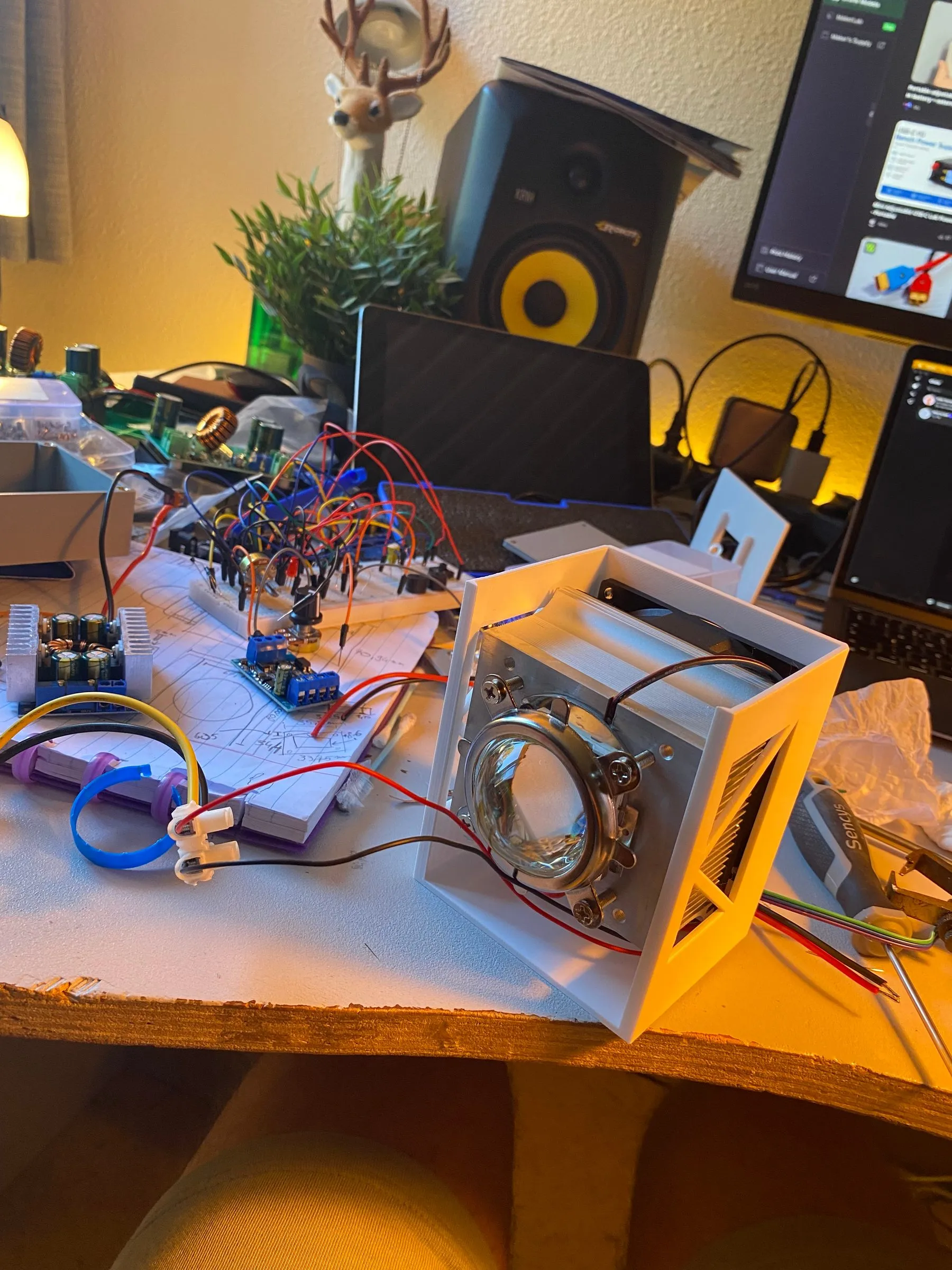
The COB LED and its optic in the 3D-printed head.
50W COB LED driven from a USB-C PD trigger board requesting 20V,
stepped through a buck-boost converter to a regulated 15V with a 3.3A
current limit, needed because the LED’s resistance drops as it heats up,
so without a limit it would pull more and more current until it burned out
Arduino Nano (chosen for its small form factor) controls brightness via
a dedicated PWM regulator, adjustable through an onboard potentiometer
Onboard display shows live stats: output percentage, input voltage,
and calculated wattage/amperage draw to the LED
Input voltage monitoring via a voltage divider, so the light won’t
power on below 12V and can detect voltage sag (when the USB-C adapter
can’t supply what the LED is demanding), automatically throttling output
to bring the voltage back to normal
Thermal protection: a thermistor mounted directly under the LED die
tracks temperature. Output is throttled as it approaches 50°C, and the LED
fully shuts off into a cooldown mode above that threshold, only turning
back on once it’s dropped below a configured temperature
Single-button interface to cycle which stat is shown on the display
Active cooling: heatsink + thermal paste + 12V fan (with its own 12V
converter, since nothing else in the system ran on 12V)
Custom 3D-printed PETG housing (chosen for its heat resistance),
split into two hinged halves (electronics base and LED head) so the beam
angle can be adjusted and held at any tightness via the hinge
Housing design details: flush countersunk screw holes and heat-set
threaded inserts for mounting the lid and internal components like the
buck-boost converter
Challenges
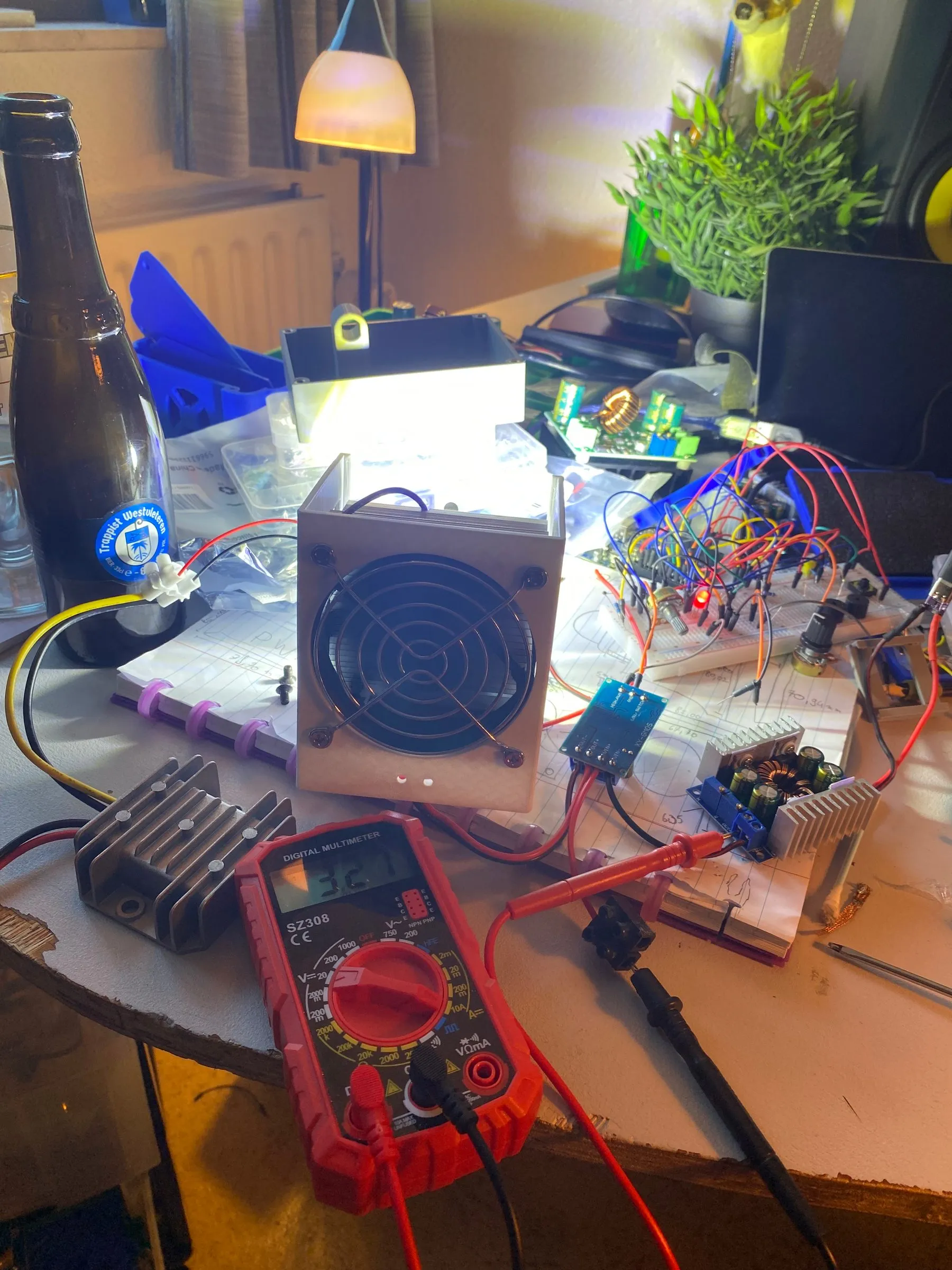
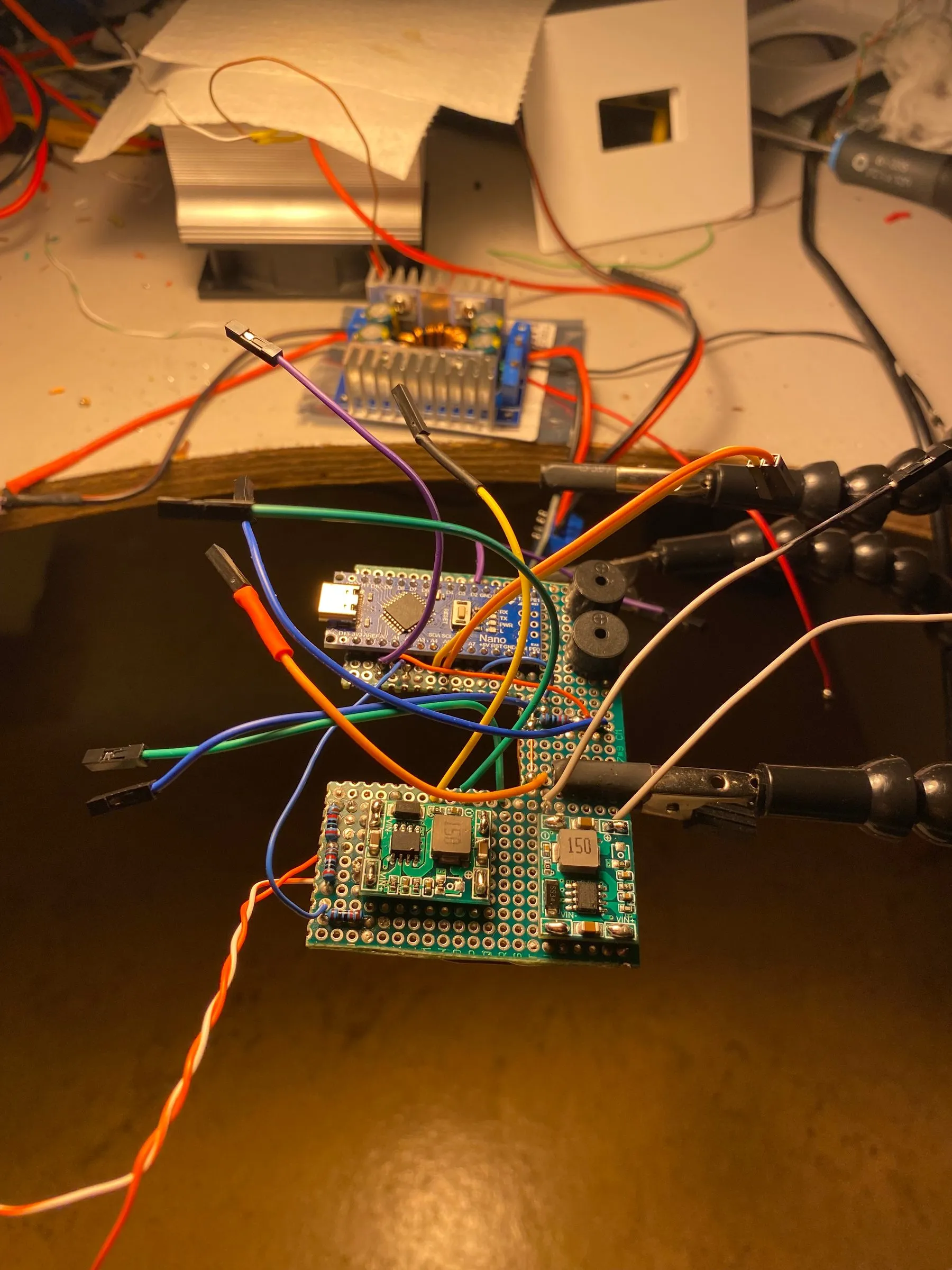
The soldered board that ended up running everything, from the Nano to the PWM regulator and safety logic.
The biggest lessons came from buying the wrong parts before understanding
the physics involved:
First attempt used a fixed 12V buck converter with no current limiting.
Turned out the LED needed 15V to hit its full potential, and more
importantly, as COB LEDs heat up their resistance drops, so they pull
increasing current at a fixed voltage. Without a current limiter, that’s a
direct path to burning out the LED.
For dimming, I originally used a motor PWM driver, which actually worked
fine for the LED. But once I decided the Arduino should own dimming (to
layer in the safety features), I tried to “hack” into the motor driver’s
potentiometer input using optoresistors. It wasn’t reliable enough, so I
switched to a dedicated PWM regulator that accepts a direct PWM signal
from the Arduino.
Getting the power output ramp curve right so the USB-C PD adapter doesn’t
trip its own overcurrent protection when the LED suddenly demands a lot of
current.
What I learned
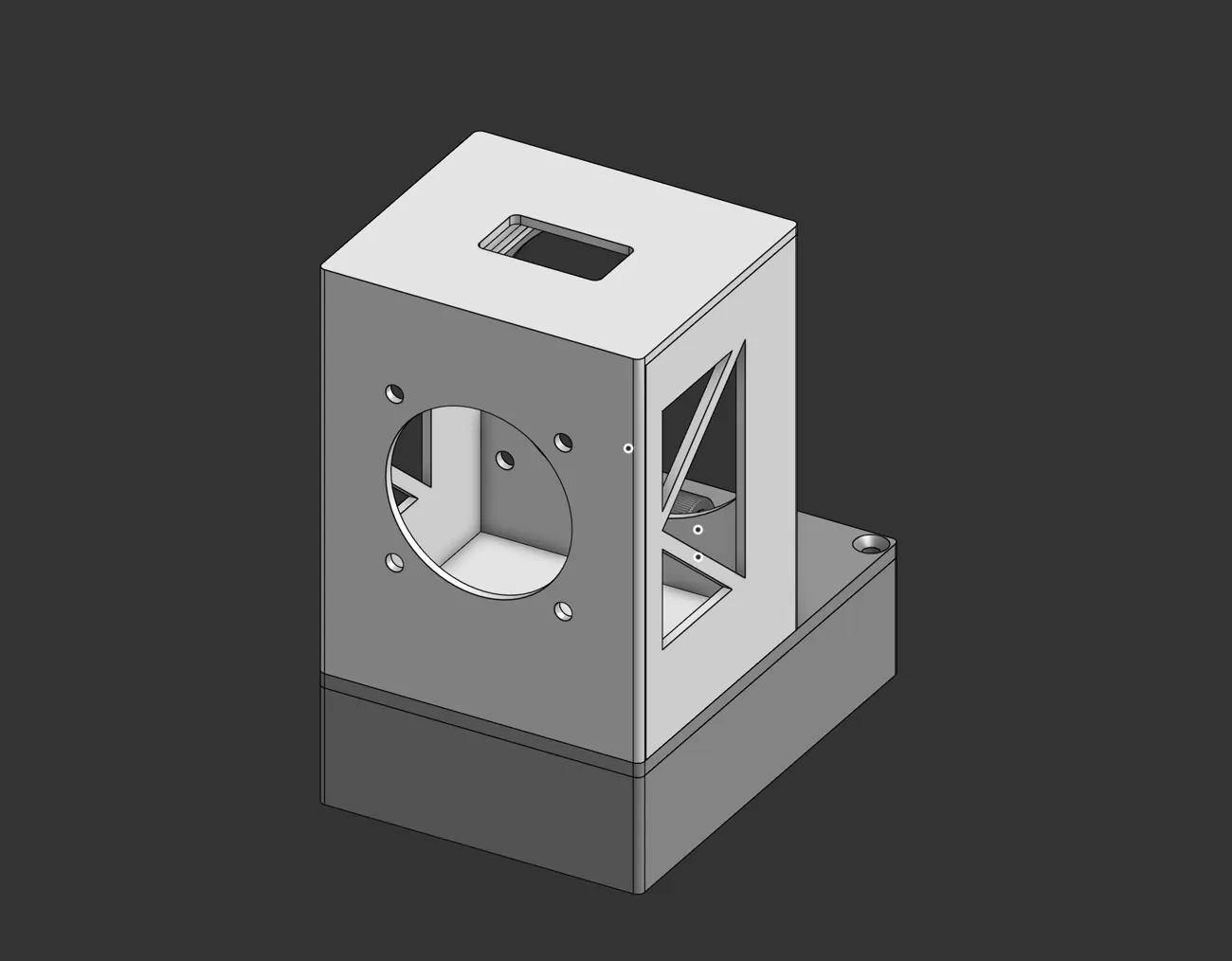
The housing in OnShape, with its hinged head, fan cutout, vents and heat-set insert bosses.
USB-C PD triggering and negotiating higher voltages for power-hungry loads
Buck-boost conversion and current limiting as protection against thermal
runaway in high-power LEDs
Safely reading higher voltages into a microcontroller using a voltage
divider
Building real-time protection logic: voltage-sag detection and
thermal throttling/cutoff with cooldown hysteresis
3D design techniques for functional enclosures, including heat-set insert
holes, flush countersunk screws, and adjustable hinge mechanisms
Iterating on hardware choices quickly when a component doesn’t actually
meet the electrical or thermal requirements of the project
software·August 2026
Pukkelpop Ticket Resale Watcher
A Python watcher that tracks Pukkelpop resale ticket listings and pushes real-time price alerts to phone and Mac.
Python
Automation
Overview
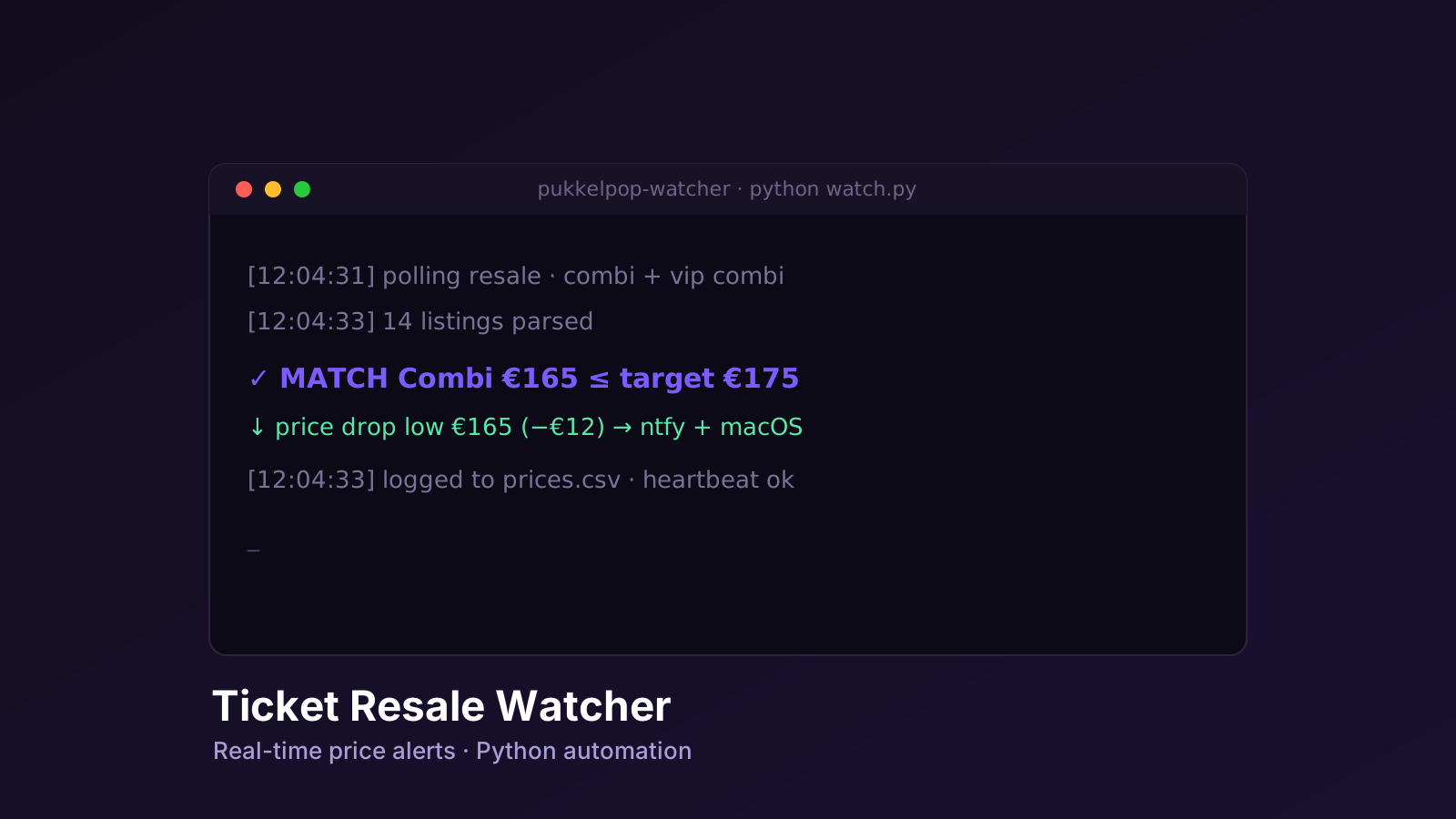
The watcher, mid-poll.
Festival resale tickets come and go fast, and good prices don’t last;
manually refreshing Pukkelpop’s resale page all day isn’t realistic. This
script does it instead: it polls the official resale pages for both combi
and VIP combi tickets, parses out current listings and prices, and pushes a
notification the moment something worth acting on appears, whether that’s
a ticket under a target price, or the lowest available price dropping
significantly.
Key features
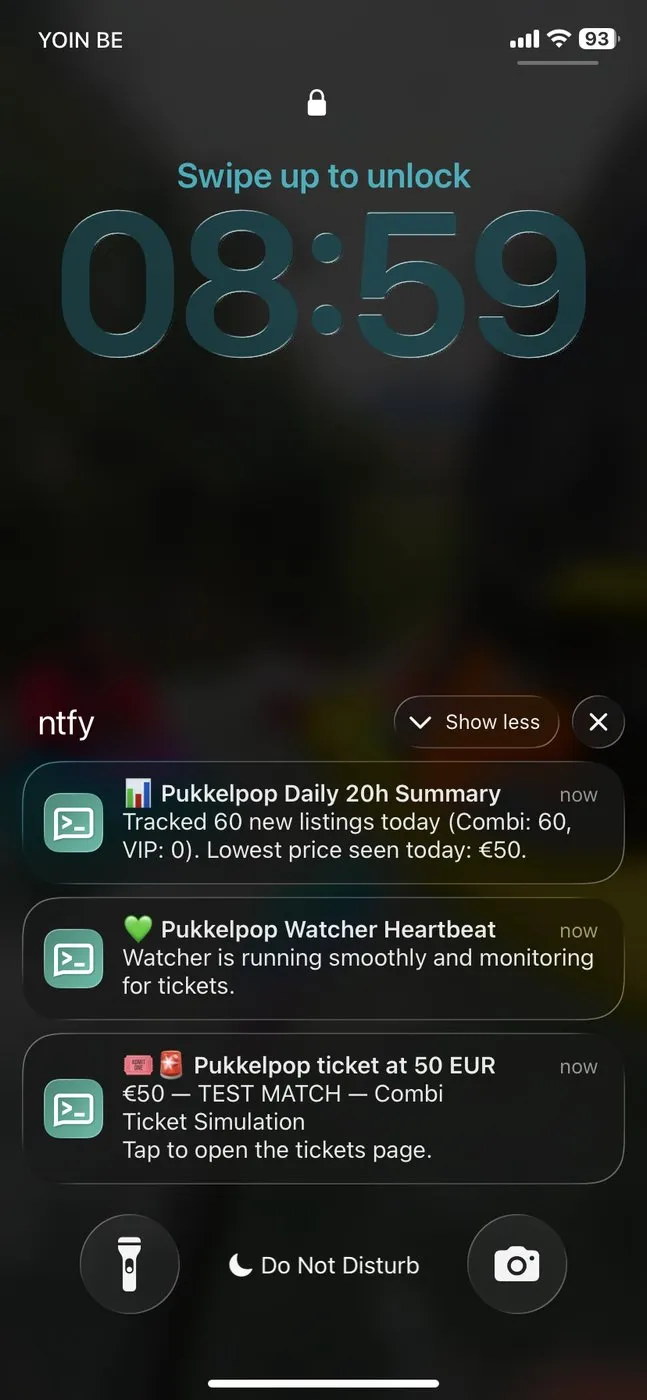
The alerts actually landing on my phone through ntfy.
Polls Pukkelpop’s resale ticket pages on a randomized, jittered interval
to avoid predictable, bot-like request patterns
Parses listings and prices directly out of the page HTML, handling
European number formatting (comma vs. period as decimal separator)
Match alerts push a notification (via ntfy.sh to phone, and a
native macOS notification) when a listing appears at or below a
configured max price, with an option to auto-open the ticket page in the
browser
Price drop alerts track the lowest price seen per ticket type and
send a dedicated alert when a new lowest price drops by at least a
configured threshold (default: €10)
Price history logging appends every newly seen listing to a local
CSV, building a running history of resale pricing over time
Daily summary, one push notification per day recapping how many
listings were seen and the lowest price of the day
Heartbeat notification every 6 hours confirming the watcher is
still running
State persistence for seen tickets, seen alerts, and price
baselines, stored locally so restarting the script doesn’t cause
duplicate CSV entries or repeated alerts
Built-in test mode (--test) that simulates the entire notification
pipeline (match alert, price drop, heartbeat, and daily summary) without
waiting for a real trigger
Challenges
Reliably parsing prices out of loosely structured HTML, with inconsistent
number formatting between sources (comma as decimal separator vs.
thousands separator)
Avoiding duplicate or noisy alerts across script restarts, which needed a
small local state system layered on top of the CSV price log
Balancing polling frequency against not hammering the site or looking
like a bot; solved with randomized jitter on top of the base polling
interval
What I learned
Lightweight web scraping and HTML parsing with BeautifulSoup and regex on
real-world, inconsistently formatted pages
Building a small but resilient local automation tool: state persistence,
deduplication, and a self-test mode
Push notification integration via ntfy.sh, alongside native macOS
notifications through terminal-notifier/osascript
Designing polling behavior (jitter, heartbeats, daily summaries) that
stays timely without being disrespectful to the target site
The code
The whole watcher is a single self-contained Python script. It’s folded away
below so it stays out of the way; expand it to read the full source.
View the full source pukkelpop_watcher.py · 475 lines
#!/usr/bin/env python3import argparseimport csvimport jsonimport osimport randomimport reimport subprocessimport sysimport timeimport webbrowserfrom datetime import datetimefrom urllib.parse import urljoinimport requestsfrom bs4 import BeautifulSoupWATCH_URLS = [ "https://tickets.pukkelpop.be/nl/meetup/demand/?type=combi&camping=a&price=all", "https://tickets.pukkelpop.be/nl/meetup/demand/?type=vip_combi&camping=a&price=all#tickets",]MAX_PRICE = 250DROP_THRESHOLD = 10.0POLL_SECONDS = 120JITTER_SECONDS = 30BASE = "https://tickets.pukkelpop.be"NTFY_ENABLED = TrueNTFY_TOPIC = "pkp-CHANGE-ME"MACOS_NOTIFY_ENABLED = TrueAUTO_OPEN_BROWSER = FalseHEARTBEAT_HOURS = 6CSV_FILE = os.path.join(os.path.dirname(os.path.abspath(__file__)), "price_history.csv")COOKIE = ""STATE_FILE = os.path.expanduser("~/.pukkelpop_watcher_seen.json")DEBUG_HTML_FILE = os.path.join(os.path.dirname(os.path.abspath(__file__)), "last_page.html")HEADERS = { "User-Agent": ("Mozilla/5.0 (Macintosh; Intel Mac OS X 10_15_7) " "AppleWebKit/537.36 (KHTML, like Gecko) " "Chrome/124.0 Safari/537.36"), "Accept": "text/html,application/xhtml+xml,application/xml;q=0.9,*/*;q=0.8", "Accept-Language": "nl-BE,nl;q=0.9,en;q=0.8",}if COOKIE: HEADERS["Cookie"] = COOKIEPRICE_RE = re.compile( r"€\s*([0-9]{1,4}(?:[.,][0-9]{2})?)" r"|([0-9]{1,4}(?:[.,][0-9]{2})?)\s*(?:€|EUR)", re.IGNORECASE,)def log(msg): print(f"[{datetime.now():%Y-%m-%d %H:%M:%S}] {msg}", flush=True)def to_float(raw): raw = raw.strip().replace(" ", "") if "," in raw and "." in raw: if raw.rfind(",") > raw.rfind("."): raw = raw.replace(".", "").replace(",", ".") else: raw = raw.replace(",", "") elif "," in raw: raw = raw.replace(",", ".") if re.search(r",\d{2}$", raw) else raw.replace(",", "") try: return float(raw) except ValueError: return Nonedef prices_in(text): out = [] for m in PRICE_RE.finditer(text): val = to_float(m.group(1) or m.group(2) or "") if val is not None and 10 <= val <= 5000: out.append(val) return outdef parse_listings(html): soup = BeautifulSoup(html, "html.parser") listings = [] seen_urls = set() for a in soup.find_all("a", href=True): href = a["href"] if "/meetup/buy/" not in href: continue if href in seen_urls: continue seen_urls.add(href) container = a found = [] for _ in range(4): found = prices_in(container.get_text(" ", strip=True)) if found: break if container.parent is None: break container = container.parent price = min(found) if found else None label = a.get_text(" ", strip=True)[:80] or "listing" listings.append({ "price": price, "item_id": href, "buy_url": urljoin(BASE, href), "label": label, }) return listingsdef load_seen(): try: with open(STATE_FILE) as f: return set(json.load(f)) except (FileNotFoundError, json.JSONDecodeError): return set()def save_seen(seen): try: with open(STATE_FILE, "w") as f: json.dump(sorted(seen), f) except OSError as e: log(f"warn: could not save state: {e}")def load_tracker_seen(): seen = set() if os.path.exists(CSV_FILE): try: with open(CSV_FILE, "r", encoding="utf-8") as f: reader = csv.reader(f) next(reader, None) for row in reader: if len(row) >= 4: seen.add(row[3]) except Exception: pass return seendef load_lowest_prices(): lowest = {} if os.path.exists(CSV_FILE): try: with open(CSV_FILE, "r", encoding="utf-8") as f: reader = csv.reader(f) next(reader, None) for row in reader: if len(row) >= 3: t_type = row[1] try: price = float(row[2]) if t_type not in lowest or price < lowest[t_type]: lowest[t_type] = price except ValueError: pass except Exception: pass return lowestdef log_price_to_csv(ticket_type, price, item_id, label): file_exists = os.path.exists(CSV_FILE) try: with open(CSV_FILE, "a", newline="", encoding="utf-8") as f: writer = csv.writer(f) if not file_exists: writer.writerow(["timestamp", "type", "price", "item_id", "label"]) writer.writerow([datetime.now().strftime("%Y-%m-%d %H:%M:%S"), ticket_type, price, item_id, label]) except Exception as e: log(f"warn: failed to write to CSV: {e}")def notify_ntfy(price, page_url, label): if not (NTFY_ENABLED and NTFY_TOPIC and "CHANGE-ME" not in NTFY_TOPIC): return try: requests.post( f"https://ntfy.sh/{NTFY_TOPIC}", data=f"€{price:.0f}: {label}\nTap to open the tickets page, then press the price to reserve.".encode("utf-8"), headers={ "Title": f"Pukkelpop ticket at {price:.0f} EUR", "Priority": "5", "Tags": "tickets,rotating_light", "Click": page_url, "Actions": f"view, Open tickets page, {page_url}, clear=true", }, timeout=15, ) log(" -> ntfy push sent (tickets page)") except requests.RequestException as e: log(f" -> ntfy failed: {e}")def notify_price_drop(ticket_type, new_price, old_price, target_url): drop = old_price - new_price title = f"Price Drop Alert: {ticket_type.upper()}" body = f"New lowest price: €{new_price:.0f} (Dropped by €{drop:.0f} from €{old_price:.0f})." if MACOS_NOTIFY_ENABLED and sys.platform == "darwin": if _has("terminal-notifier"): subprocess.run(["terminal-notifier", "-title", f"📉 {title}", "-message", body, "-open", target_url], check=False) else: script = f'display notification "{body}" with title "📉 {title}" sound name "Glass"' subprocess.run(["osascript", "-e", script], check=False) if NTFY_ENABLED and NTFY_TOPIC and "CHANGE-ME" not in NTFY_TOPIC: try: requests.post( f"https://ntfy.sh/{NTFY_TOPIC}", data=body.encode("utf-8"), headers={ "Title": title, "Priority": "4", "Tags": "chart_with_downwards_trend,moneybag", "Click": target_url, "Actions": f"view, Open demand page, {target_url}, clear=true", }, timeout=15, ) log(" -> Price drop push notification sent") except requests.RequestException as e: log(f" -> Price drop ntfy failed: {e}")def notify_heartbeat(): if not (NTFY_ENABLED and NTFY_TOPIC and "CHANGE-ME" not in NTFY_TOPIC): return try: requests.post( f"https://ntfy.sh/{NTFY_TOPIC}", data="Watcher is running smoothly and monitoring for tickets.".encode("utf-8"), headers={"Title": "Pukkelpop Watcher Heartbeat", "Tags": "green_heart"}, timeout=15 ) log(" -> Sent heartbeat push") except requests.RequestException: passdef send_daily_summary(): if not os.path.exists(CSV_FILE): return today_str = datetime.now().strftime("%Y-%m-%d") count_combi = 0 count_vip = 0 lowest_price = float('inf') try: with open(CSV_FILE, "r", encoding="utf-8") as f: reader = csv.reader(f) next(reader, None) for row in reader: if len(row) >= 5: dt_str, t_type, price_str, item_id, label = row if dt_str.startswith(today_str): if "vip" in t_type.lower(): count_vip += 1 else: count_combi += 1 try: p = float(price_str) if p < lowest_price: lowest_price = p except ValueError: pass except Exception as e: log(f"CSV read error: {e}") return total = count_combi + count_vip if total == 0: return msg = f"Tracked {total} new listings today (Combi: {count_combi}, VIP: {count_vip}). Lowest price seen today: €{lowest_price:.0f}." if not (NTFY_ENABLED and NTFY_TOPIC and "CHANGE-ME" not in NTFY_TOPIC): log(f"Daily Summary: {msg}") return try: requests.post( f"https://ntfy.sh/{NTFY_TOPIC}", data=msg.encode("utf-8"), headers={"Title": "Pukkelpop Daily 20h Summary", "Tags": "bar_chart"}, timeout=15 ) log(" -> Sent daily 20h summary push") except requests.RequestException: passdef notify_macos(price, page_url, label): if not (MACOS_NOTIFY_ENABLED and sys.platform == "darwin"): return title = f"Pukkelpop ticket €{price:.0f}" if _has("terminal-notifier"): subprocess.run(["terminal-notifier", "-title", title, "-message", label, "-open", page_url], check=False) else: script = f'display notification "{label}" with title "{title}" sound name "Glass"' subprocess.run(["osascript", "-e", script], check=False) log(" -> macOS notification shown")def _has(cmd): return subprocess.run(["which", cmd], capture_output=True).returncode == 0def check_url(url, alert_seen, tracker_seen, lowest_prices): try: r = requests.get(url, headers=HEADERS, timeout=25) except requests.RequestException as e: log(f"fetch error [{url}]: {e}") return if r.status_code != 200: log(f"HTTP {r.status_code} on {url}.") return listings = parse_listings(r.text) ticket_type = url.split("type=")[1].split("&")[0] if "type=" in url else "unknown" if not listings: log(f"[{ticket_type}] no listings parsed") return priced = [l for l in listings if l["price"] is not None] cheapest = min((l["price"] for l in priced), default=None) log(f"[{ticket_type}] {len(listings)} listings, {len(priced)} priced, " f"cheapest = {('€%.0f' % cheapest) if cheapest else 'n/a'}") if cheapest is not None: prev_lowest = lowest_prices.get(ticket_type) if prev_lowest is None: lowest_prices[ticket_type] = cheapest elif prev_lowest - cheapest >= DROP_THRESHOLD: log(f"PRICE DROP WARNING [{ticket_type}]: €{cheapest:.0f} (was €{prev_lowest:.0f})") notify_price_drop(ticket_type, cheapest, prev_lowest, url) lowest_prices[ticket_type] = cheapest for l in priced: if l["item_id"] not in tracker_seen: log_price_to_csv(ticket_type, l["price"], l["item_id"], l["label"]) tracker_seen.add(l["item_id"]) unique_id = f"{url}#{l['item_id']}" if l["price"] <= MAX_PRICE and unique_id not in alert_seen: log(f"MATCH €{l['price']:.0f} on [{ticket_type}]: {url}") if AUTO_OPEN_BROWSER: log(" -> Auto-opening tickets page (safe, does NOT reserve)...") webbrowser.open(url) notify_ntfy(l["price"], url, l["label"]) notify_macos(l["price"], url, l["label"]) alert_seen.add(unique_id) save_seen(alert_seen)def fetch_one_real_listing(): for url in WATCH_URLS: try: r = requests.get(url, headers=HEADERS, timeout=25) except requests.RequestException as e: log(f" -> fetch error while looking for a real listing: {e}") continue if r.status_code != 200: log(f" -> HTTP {r.status_code} while looking for a real listing") continue listings = parse_listings(r.text) ticket_type = url.split("type=")[1].split("&")[0] if "type=" in url else "unknown" priced = [l for l in listings if l["price"] is not None] pick = priced[0] if priced else (listings[0] if listings else None) if pick: return url, pick["price"], pick["label"], ticket_type return Nonedef run_test(): log("=== RUNNING ALL NOTIFICATION TESTS ===") test_url = WATCH_URLS[0] log("1/7 Logging test entry to CSV...") log_price_to_csv("combi", 150.0, "/test/simulated-ticket-1", "Test Ticket Simulation") time.sleep(1) log("2/7 Testing Auto-Open Browser (tickets page only)...") if AUTO_OPEN_BROWSER: webbrowser.open(test_url) time.sleep(1.5) else: log(" -> AUTO_OPEN_BROWSER is off; skipping (safe default, nothing reserved).") log("3/7 Testing Ticket Match Alert (macOS & ntfy, tickets page)...") notify_macos(150.0, test_url, "TEST MATCH: Combi Ticket €150") notify_ntfy(150.0, test_url, "TEST MATCH: Combi Ticket €150") time.sleep(2) log("4/7 Testing Price Drop Warning Alert...") notify_price_drop("combi", 180.0, 200.0, test_url) time.sleep(2) log("5/7 Testing System Heartbeat Alert...") notify_heartbeat() time.sleep(2) log("6/7 Testing Daily 20h Summary Alert...") send_daily_summary() time.sleep(2) log("7/7 Fetching a REAL listing to test the tickets-page notification...") real = fetch_one_real_listing() if real: page_url, price, label, ticket_type = real price_str = f"€{price:.0f}" if price is not None else "€?" log(f" -> Found real listing: {price_str} [{ticket_type}] -> {page_url}") notify_ntfy(price if price is not None else 0.0, page_url, f"[REAL TEST] {label}") notify_macos(price if price is not None else 0.0, page_url, f"[REAL TEST] {label}") log(" -> Real push sent. Tap it ON YOUR PHONE to confirm it opens the tickets page.") else: log(" -> No real listings available right now (page empty / sold out). " "Re-run the test when listings exist.") log("=== TEST COMPLETE: Check your phone, Mac notifications, and price_history.csv ===")def main(): ap = argparse.ArgumentParser() ap.add_argument("--once", action="store_true", help="check a single time and exit") ap.add_argument("--test", action="store_true", help="run system test") args = ap.parse_args() if args.test: run_test() return log(f"Watching {len(WATCH_URLS)} ticket pages:") for url in WATCH_URLS: log(f" - {url}") log(f"Alerting at <= €{MAX_PRICE:.0f}. Price drop threshold: >= €{DROP_THRESHOLD:.0f}. Ctrl-C to stop.") alert_seen = load_seen() tracker_seen = load_tracker_seen() lowest_prices = load_lowest_prices() if args.once: for url in WATCH_URLS: check_url(url, alert_seen, tracker_seen, lowest_prices) return last_heartbeat_time = time.time() last_summary_date = datetime.now().date() while True: now = datetime.now() if now.hour == 20 and last_summary_date != now.date(): send_daily_summary() last_summary_date = now.date() if time.time() - last_heartbeat_time > (HEARTBEAT_HOURS * 3600): notify_heartbeat() last_heartbeat_time = time.time() for url in WATCH_URLS: check_url(url, alert_seen, tracker_seen, lowest_prices) wait = POLL_SECONDS + random.randint(-JITTER_SECONDS, JITTER_SECONDS) time.sleep(max(30, wait))if __name__ == "__main__": main()
software·January 2024
Appscape
A pixel-art puzzle-platformer built in Unity for mobile, with checkpoints, keys, moveable objects, and physics-based hazards across six levels.
Unity
C#
Game Dev
Mobile
Overview
Appscape is a 2D pixel-art puzzle-platformer built with Unity for a
university mobile applications course, as a three-person team project. The
player runs, jumps, and pushes objects through six hand-built levels, using
touch controls designed for mobile first and keyboard as a fallback for
desktop play.
Each level is a self-contained physics puzzle: collect the keys needed to
unlock the level’s exit, avoid instant-death hazards, and reposition
moveable crates and platforms to reach otherwise out-of-reach areas.
Key features
Touch-first controls: on-screen left/right/jump buttons wired through
Unity’s EventTrigger system for press-and-hold movement, alongside
arrow-key input for desktop testing
Checkpoints that save full level state: not just the player’s
position, but the collected/uncollected state of every key and the
position, rotation, and active status of every moveable object in the
level, so a death mid-puzzle doesn’t undo earlier progress
Key-and-lock progression: each level gates its exit door behind a
number of collectible keys, tracked with a live on-screen counter
Physics-based hazards: falling weighted props that kill on impact
above a velocity threshold, arrow traps that fire in timed bursts, and
rolling boulders that chase the player down slopes
Sticky platforms and teleporters: platforms the player can ride
(implemented by re-parenting the player to the platform’s transform), and
cooldown-gated teleport pads with a fog transition effect
Level select and pause/options menus, with music and SFX volume
sliders persisted through PlayerPrefs
Built entirely on free asset packs (Pixel Adventure, Cainos) for sprites
and tilesets, with a custom pixel-art start/end screen and app icon
Challenges
Working as a three-person team on a single Unity project surfaced problems
that don’t show up solo:
Scene merge conflicts: .unity scene files are large serialized YAML
documents, and two people editing the same level scene in parallel
produced conflicts that couldn’t be resolved with a normal text diff —
the team settled on splitting work by level/scene ownership to avoid them
entirely.
State that has to survive a checkpoint reload: reloading a checkpoint
naively would reset every pushable object and key to its level-start
state, undoing real progress. GameState snapshots and restores object
and key state explicitly rather than relying on scene reload.
Physics-based hazards feeling fair: a falling prop that kills on any
contact reads as cheap; tying the kill condition to the prop’s impact
velocity (deadlyVelocity) meant a gentle nudge wasn’t lethal, but a
genuine drop was.
What I learned
Structuring shared state (keys, moveable objects, checkpoints) so it
round-trips cleanly through save/restore, instead of leaking level-reset
bugs
Building touch-first UI input in Unity with EventTrigger press/hold
semantics, rather than assuming Input.GetKey polling is enough
Working inside a Unity project as a team: dividing work by scene to avoid
unmergeable YAML conflicts, and agreeing on prefab ownership up front
Tuning physics-based hazards (velocity thresholds, force impulses) until
they felt readable and fair rather than arbitrary